> For the complete documentation index, see [llms.txt](https://pro-hytale-mods.gitbook.io/pro-hytale-mods-docs/llms.txt). Markdown versions of documentation pages are available by appending `.md` to page URLs; this page is available as [Markdown](https://pro-hytale-mods.gitbook.io/pro-hytale-mods-docs/getting-started/quickstart.md).
# Overview
## PartyPro — Mod Overview
The ultimate party system for Hytale. Team up with friends, track each other on the map, share XP, ping locations, chat privately, and compete on leaderboards.
***
### What Is PartyPro?
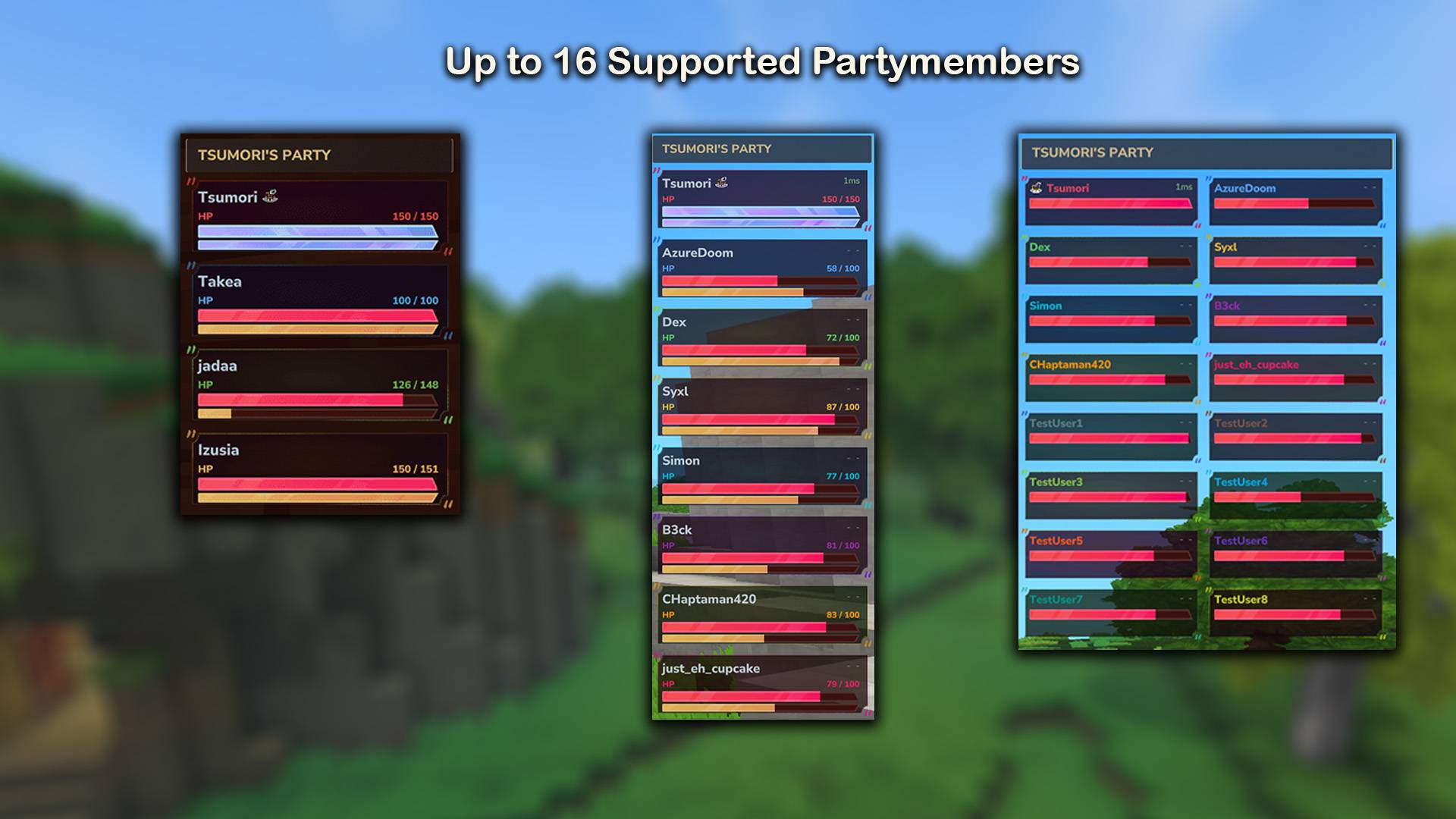
PartyPro adds a complete party system to any Hytale server. Players can form groups of up to 16, see each other's health and location in a real-time HUD, communicate through private party chat, ping locations, share experience points, and progress through configurable milestones.
The plugin ships with a **new sidebar-style UI** that replaces the classic tab layout — featuring a dashboard home, detail-drawer member view, live activity feed, milestone-based stats, and card-style leaderboards. The classic UI is still available via the `Classic UI` button in the sidebar.
Server admins get a deeply configurable system that works out of the box with zero setup.
***
### Features
#### Party System
* Create, join, and manage parties with `/p`
* Configurable party size (2–16 players)
* Public parties anyone can join, or private parties with optional password protection
* Invite system with accept/decline and configurable expiration timer
* Auto-accept and auto-decline invite modes per player
* Leadership transfer and member kicking
* Parties persist across server restarts
* Automatic removal of players who stay offline too long (configurable)
#### Party HUD
* Real-time overlay showing all party members
* Health and energy bars per member
* Network ping display (color-coded: green / yellow / red)
* Distance to each member (or exact coordinates, toggleable)
* Custom text slots for levels, classes, or ranks (via integrations or API)
* Online / offline indicators
* Leader icon
* Party chat toggle indicator
* Three display modes: **Normal** (detailed), **Compact** (minimal), **Status** (status-icons only)
* Configurable position: left or right side, custom X / Y offsets
* Per-player settings — each player controls their own HUD
* **MultipleHUD support** — runs alongside other custom-HUD plugins (RPGLeveling, etc.) when MultipleHUD is installed; falls back to standard HUD slot otherwise
#### Map & Compass Tracking
* Party members appear as colored icons on the world map
* Distance labels on each marker
* Ping locations also shown on the map
* 16 unique member colors
* Three waypoint modes: show all players, party only, or none
#### Ping System
* Middle-click any block to ping its location for your party
* Colored beacon particle effect visible in the world (30-second duration)
* Ping markers on the world map
* Each member gets a unique color
* Cooldown to prevent spam
#### Party Chat
* Toggle party chat mode with `/p chat`
* When enabled, all messages go only to party members
* Formatted with `[Party]` prefix
* Chat history viewable in the Party Browser GUI
* Chat indicator on the HUD
* **Unread chat badge** in the new UI sidebar (Chat nav button)
#### Party Browser GUI (New UI)
Open with `/p`. The new UI is a **sidebar layout** with seven sections:
| Section | What it shows |
| ------------ | ----------------------------------------------------------------------------------------------------------------------------------------------- |
| **Home** | Dashboard — server overview, your status, featured parties, your stats |
| **My Party** | Detail drawer: member list (left), selected-member detail (right), live activity feed (bottom) |
| **Browse** | Sub-tabs: **Parties** (search + quick filters) and **Players** (online players, invitable) |
| **Invites** | Pending invites with accept / decline |
| **Chat** | Party chat reader and input |
| **Stats** | Milestone progress with optional compare mode |
| **Settings** | Sub-tabs: **General** (HUD settings), **My Party** (party settings, only when in party), **Integrations** (only when integration plugin loaded) |
**My Party — Detail Drawer**
Members are shown as compact rows on the left. Click one to view its full details on the right:
* Avatar, name, role (Leader / Member / You / Offline)
* HP bar with text + percentage
* Stamina bar with text + percentage (scaled to /100 from raw /10)
* Ping (ms)
* **RPG Level** (when RPGLeveling integration active)
* **Skills list** with all leveled skills (when MMOSkillTree integration active)
* Distance from you
* Action buttons: Teleport / Promote / Kick (visibility based on role and config)
The detail panel is independently scrollable when content overflows.
**Live Activity Feed**
The bottom panel of My Party shows recent party events, merged with chat history and sorted by time. Tracked events:
* Member joined / left / kicked / promoted (leader transfer)
* Party renamed / disbanded
* Party setting toggles (PvP, Public, Password, Max Size)
* Teleports between members
* PvP kills and PvP deaths (member ↔ enemy with party context)
* Environmental and mob deaths
* Recent chat messages
#### Statistics & Milestones
Tracked per player and per party:
* Mob kills, player kills, deaths
* Damage dealt and taken
* Blocks placed and broken
* Items collected and crafted
* Distance traveled
* Pings sent, teleports used
* Time spent together (only counted when 2+ members are online)
The **Stats tab** in the new UI shows these as **milestone progress cards** — each milestone is a configurable goal (e.g., "Kill 1000 mobs") tied to one of the tracked stats. A progress bar shows how close you are.
**Compare mode**: Toggle the `COMPARE` button to compare two members side-by-side. A second member-selector appears, both bars are shown per milestone, and the leader's name is highlighted in the milestone header.
Stats can be configured to reset automatically (every N days or N months).
#### Leaderboard
The **Stats → Leaderboard** sub-tab in the new UI shows all parties as **rich cards**. Each card displays:
* Rank badge — gold / silver / bronze for the top 3
* Party name and member count
* Active time (time-together)
* All key stats inline: KILLS, DAMAGE, BLOCKS, DISTANCE
Sort by category (Kills / Damage / Blocks / Distance / Time) — the cards re-rank but always show all stats. Top 20 parties displayed.
#### PvP Protection, Avatars, Teleport
* **PvP Protection** — friendly fire between party members is blocked by default. Leader toggles per party.
* **Player Avatars** — headshots fetched from a configurable API and cached locally.
* **Teleportation** — `/p tp ` (if enabled in config). Configurable cooldown.
***
### Commands
| Command | Description | Permission | Role |
| ---------------------- | ---------------------------------------------- | ------------------------------------- | -------------- |
| `/p` | Opens the Party Browser GUI | `tsumori.partypro.command.p` | All |
| `/p create ` | Creates a new party | `tsumori.partypro.command.p.create` | All |
| `/p rename ` | Renames your party | `tsumori.partypro.command.p.rename` | Leader |
| `/p invite ` | Invites a player to your party | `tsumori.partypro.command.p.invite` | Leader |
| `/p invites` | Shows your pending invites | `tsumori.partypro.command.p.invites` | All |
| `/p accept` | Accepts a party invite | `tsumori.partypro.command.p.accept` | All |
| `/p decline` | Declines a party invite | `tsumori.partypro.command.p.decline` | All |
| `/p leave` | Leaves your current party | `tsumori.partypro.command.p.leave` | All |
| `/p kick ` | Kicks a member | `tsumori.partypro.command.p.kick` | Leader |
| `/p transfer ` | Transfers leadership | `tsumori.partypro.command.p.transfer` | Leader |
| `/p disband` | Disbands the party | `tsumori.partypro.command.p.disband` | Leader |
| `/p tp ` | Teleports to a party member | `tsumori.partypro.command.p.tp` | All |
| `/p chat` | Toggles party chat mode on/off | `tsumori.partypro.command.p.chat` | All |
| `/p info` | Shows party information | `tsumori.partypro.command.p.info` | All |
| `/p browse` | Browse parties and players | `tsumori.partypro.command.p.browse` | All |
| `/p debug` | Debug commands (add/remove fakes, list, clear) | `tsumori.partypro.command.p.debug` | Admin |
| `/ping` | Pings the block you're looking at | `tsumori.partypro.command.ping` | All (in party) |
#### Wildcard Permissions
* `tsumori.partypro.command.*` — all PartyPro commands
* `tsumori.partypro.command.p.*` — all `/p` subcommands
#### Aliases
* `/party` works the same as `/p`
* `/p accept` also works as `/p join`
* `/p decline` also works as `/p deny`
* `/p kick` also works as `/p remove`
* `/p transfer` also works as `/p promote`
* `/p tp` also works as `/p teleport` or `/p goto`
* `/p info` also works as `/p status`, `/p list`, `/p members`
* `/p browse` also works as `/p browser`, `/p find`, `/p players`
* `/p invites` also works as `/p pending`
#### Permission Notes
Permission nodes are auto-generated by Hytale based on the plugin group (`tsumori`), plugin name (`partypro`), and command name. By default, all commands except `/p debug` are available to players in Adventure mode. `/p debug` requires Creative mode (OP).
The "Leader" role is checked at runtime — the command itself is accessible, but only the party leader can execute it. Non-leaders get an error message.
Use `/perm user add tsumori.partypro.command.p.tp` to grant individual command access, or `/perm group add tsumori.partypro.command.p.*` for all party commands.
***
### Configuration
All settings live in `PartyPro/config.json`, auto-created on first run.
#### Party Settings
| Key | Default | Description |
| ----------------------- | ------- | ------------------------------------------------------------ |
| `maxPartySize` | `8` | Maximum members per party (2–16) |
| `teleportEnabled` | `false` | Allow `/p tp` |
| `keepPartyOnDisconnect` | `true` | Keep party intact when a player disconnects |
| `showInvitePopup` | `false` | Show a popup overlay when receiving invites (only when idle) |
| `inviteDurationSeconds` | `60` | How long an invite stays valid |
#### HUD Settings
| Key | Default | Description |
| ------------------- | ------- | ---------------------------------------------- |
| `hudSide` | `RIGHT` | Which side of the screen (`LEFT` or `RIGHT`) |
| `hudOffset` | `30` | Distance from screen edge (pixels) |
| `hudTop` | `130` | Distance from top of screen (pixels) |
| `hudWidth` | `260` | HUD width (pixels) |
| `hudUpdateInterval` | `25` | Refresh rate in milliseconds |
| `hudInitDelay` | `500` | Delay before HUD appears after joining a world |
#### Cooldowns (seconds)
| Key | Default | Description |
| ------------------ | ------- | ----------------------- |
| `inviteCooldown` | `10` | Between sending invites |
| `teleportCooldown` | `30` | Between teleports |
| `pingCooldown` | `5` | Between pings |
#### Map & Ping
| Key | Default | Description |
| ------------------------ | ------- | ----------------------------------- |
| `compassTrackingEnabled` | `true` | Show party members on the world map |
| `compassChunkViewRadius` | `100` | View radius for map markers |
| `pingEnabled` | `true` | Enable the ping system |
| `pingMaxDistance` | `1000` | Maximum ping distance in blocks |
#### Offline Handling
| Key | Default | Description |
| -------------------- | ------- | ----------------------------------------------------- |
| `offlineRemovalTime` | `0` | Minutes until offline players are removed (0 = never) |
#### Stats Reset
| Key | Default | Description |
| ------------------ | ------- | ----------------------------------------- |
| `statsResetDays` | `0` | Reset stats every N days (0 = disabled) |
| `statsResetMonths` | `0` | Reset stats every N months (0 = disabled) |
#### Integrations
| Key | Default | Description |
| -------------------------------- | ------------ | ------------------------------------------------------- |
| `simpleClaimsIntegration` | `true` | Sync party members as SimpleClaims allies |
| `rpgLevelingIntegrationEnabled` | `true` | Show RPGLeveling levels in HUD, enable XP sharing |
| `rpgLevelingFormat` | `Lv.{level}` | Level display format |
| `mmoSkillTreeIntegrationEnabled` | `true` | Show MMOSkillTree skill levels, enable skill XP sharing |
| `mmoSkillTreeFormat` | `Lv.{level}` | Skill level display format |
#### Other
| Key | Default | Description |
| ------------------------- | ------------------------------------------- | --------------------------------------- |
| `language` | `EN` | Language (EN, DE, ES, BR, HU, FR, RU) |
| `persistPartiesOnRestart` | `true` | Save parties to disk |
| `skinApiTemplate` | `https://api.hytl.skin/headshot/{username}` | Avatar API URL |
| `skinCacheHours` | `24` | How long to cache avatars |
| `chatDateFormat` | `dd.MM.yy HH:mm` | Date format for chat history timestamps |
| `debugLogging` | `false` | Verbose logging for troubleshooting |
***
### Milestone Configuration
The Stats tab milestones are fully configurable via `PartyPro/milestones.json`, auto-created on first run with sensible defaults.
```json
{
"milestones": [
{ "title": "MOB SLAYER", "target": "Kill 1000 mobs", "goal": 1000, "stat": "MOB_KILLS" },
{ "title": "ASSASSIN", "target": "Defeat 50 players", "goal": 50, "stat": "PLAYER_KILLS" },
{ "title": "BRUISER", "target": "Deal 50k damage", "goal": 50000, "stat": "DAMAGE_DEALT" },
{ "title": "TANK", "target": "Take 10k damage", "goal": 10000, "stat": "DAMAGE_TAKEN" },
{ "title": "BUILDER", "target": "Place 10k blocks", "goal": 10000, "stat": "BLOCKS_PLACED" },
{ "title": "MINER", "target": "Break 10k blocks", "goal": 10000, "stat": "BLOCKS_BROKEN" },
{ "title": "EXPLORER", "target": "Travel 1km", "goal": 1000, "stat": "DISTANCE" },
{ "title": "HUNTER GATHERER", "target": "Collect 10k items", "goal": 10000, "stat": "ITEMS_COLLECTED" },
{ "title": "CRAFTSMAN", "target": "Craft 500 items", "goal": 500, "stat": "ITEMS_CRAFTED" },
{ "title": "TELEPORTER", "target": "Use 100 teleports", "goal": 100, "stat": "TELEPORTS" }
]
}
```
#### Field reference
| Field | Type | Description |
| -------- | ----------- | --------------------------------------------------- |
| `title` | string | Bold heading shown on the milestone card |
| `target` | string | Subtitle / goal description shown next to the title |
| `goal` | long | Threshold required to reach 100% (min 1) |
| `stat` | enum string | Which stat to read — see allowed values below |
#### Allowed `stat` values
`MOB_KILLS` · `PLAYER_KILLS` · `DAMAGE_DEALT` · `DAMAGE_TAKEN` · `BLOCKS_PLACED` · `BLOCKS_BROKEN` · `DISTANCE` (in blocks) · `ITEMS_COLLECTED` · `ITEMS_CRAFTED` · `TELEPORTS`
You can:
* Add custom milestones (e.g., `"BLOCKBUSTER"` with goal `100000` for `BLOCKS_PLACED`)
* Rename existing ones
* Adjust thresholds
* Remove ones you don't want
* Reorder them (= UI order)
Unknown stat values and entries with missing required fields are silently skipped — the config is robust against typos.
***
### Integrations
PartyPro works standalone with no dependencies. When optional mods are installed, extra features unlock automatically.
#### MultipleHUD
When **Buuz135's MultipleHUD** mod is installed, PartyPro registers its HUD via MultipleHUD instead of taking over the standard custom-HUD slot. This lets PartyPro coexist with other plugins that have their own HUDs (RPGLeveling progress bar, MMOSkillTree, etc.). No configuration needed — detection is automatic via reflection.
#### RPGLeveling
* Player levels shown next to names in the HUD
* Player level shown in the new UI's My Party detail drawer
* XP sharing among party members (configurable split or bonus mode)
* Per-party-size XP multipliers
* Distance limits for XP sharing
* **Cross-world XP sharing is blocked** — players in different worlds never share XP, regardless of distance setting
* Separate config file: `RPGLeveling_x_PartyPro.json`
#### MMOSkillTree
* Selected skill level shown in the HUD
* All player's skills + levels shown in the new UI's My Party detail drawer
* Skill XP sharing among party members
* "Same skill only" or "share all skills" modes
* Polling-based XP detection with configurable interval
* Cross-world block applies here too
* Separate config file: `MMOSkillTree_x_PartyPro.json`
#### SimpleClaims
* Party members are automatically added as allies on your claims
* Allies are removed when they leave the party
* Configurable in the Integrations sub-tab of the Settings tab
***
### Languages
PartyPro ships with 7 languages. Set the `language` field in `config.json`:
| Code | Language |
| ---- | ------------------- |
| `EN` | English |
| `DE` | German |
| `ES` | Spanish |
| `BR` | Portuguese (Brazil) |
| `HU` | Hungarian |
| `FR` | French |
| `RU` | Russian |
Language files are in `PartyPro/language/`. You can edit them to customize any message, or create a new file for an unsupported language. New translation keys are automatically merged into existing files on updates.
***
### Per-Player Settings
Each player can customize their experience through the **Settings → General** tab in the Party Browser:
| Setting | Options | Description |
| ----------------- | ----------------------------------- | ------------------------------------------- |
| HUD Enabled | On / Off | Show or hide the party HUD |
| HUD Side | Left / Right | Which side of the screen |
| HUD Mode | Normal / Compact / Status | Detailed, minimal, or status-icon display |
| HUD Offset | X and Y sliders | Fine-tune HUD position |
| Show Only Online | On / Off | Hide offline members from HUD |
| Show Hint | On / Off | Show the hint text at the bottom |
| Show Party Name | On / Off | Show the party name header |
| Show Coordinates | On / Off | Show member coordinates instead of distance |
| Middle Mouse Ping | On / Off | Enable / disable middle-click pinging |
| Waypoint Mode | All / Party Only / None | Control which players appear on the map |
| Invite Mode | Normal / Auto Accept / Auto Decline | How to handle incoming invites |
These settings persist across sessions.
***
### Installation
1. Download the latest `partypro-x.x.x.jar`
2. Place it in your Hytale server's `Mods` folder
3. (Optional) Install **MultipleHUD** to let PartyPro coexist with other custom-HUD plugins
4. (Optional) Install **RPGLeveling**, **MMOSkillTree**, or **SimpleClaims** for extra integration features
5. Start the server — config files are created automatically
6. Customize `PartyPro/config.json` and `PartyPro/milestones.json` as needed
7. Restart the server to apply config changes
No mods are required for the core feature set. Integrations activate automatically when their respective mods are present.
***
### File Structure
After first run, PartyPro creates these files in the server's mod data folder:
```
PartyPro/
├── config.json # Main configuration
├── milestones.json # Stats tab milestone definitions
├── party_storage.json # Saved parties (auto-managed)
├── player_settings.json # Per-player HUD settings (auto-managed)
├── party_stats.json # Statistics (auto-managed)
├── stats_reset_data.json # Reset schedule tracking (auto-managed)
├── RPGLeveling_x_PartyPro.json # RPGLeveling XP sharing config
├── MMOSkillTree_x_PartyPro.json # MMOSkillTree XP sharing config
├── language/ # Translation files
│ ├── en.json
│ ├── de.json
│ ├── es.json
│ ├── br.json
│ ├── hu.json
│ ├── fr.json
│ └── ru.json
└── skin_cache/ # Cached player avatars
```
***
### Member Colors
Each party slot has a unique color used for map markers, ping beacons, and the compact HUD:
| Slot | Color | Hex |
| ---- | ----------- | --------- |
| 0 | Red | `#e94560` |
| 1 | Blue | `#58a6ff` |
| 2 | Green | `#56d364` |
| 3 | Yellow | `#f0c040` |
| 4 | Cyan | `#00bcd4` |
| 5 | Purple | `#9c27b0` |
| 6 | Orange | `#ff9800` |
| 7 | Pink | `#e91e63` |
| 8 | Gray Blue | `#607d8b` |
| 9 | Brown | `#795548` |
| 10 | Light Green | `#8bc34a` |
| 11 | Light Blue | `#03a9f4` |
| 12 | Deep Orange | `#ff5722` |
| 13 | Violet | `#673ab7` |
| 14 | Teal | `#009688` |
| 15 | Lime | `#cddc39` |
The party leader always occupies slot 0 (red).
***
***
### For Developers
If you're building a mod that integrates with PartyPro, see:
* **API Reference** — full technical API documentation
* **RPGLeveling Integration** — how to hook into XP sharing
* **MMOSkillTree Integration** — how to hook into skill XP sharing
* **XP Sharing Config** — multiplier and distance fine-tuning
* **PartyActivityLog** — log custom events to the in-game live feed
* **MultipleHUD Integration** — coexist with other custom-HUD plugins
---
# Agent Instructions
This documentation is published with GitBook. GitBook is the documentation platform designed so that both humans and AI agents can read, navigate, and reason over technical content effectively. Learn more at gitbook.com.
## Querying This Documentation
If you need additional information that is not directly available in this page, you can query the documentation by asking a question.
Perform an HTTP GET request on the following URL with the `ask` and `goal` query parameters:
```
GET https://pro-hytale-mods.gitbook.io/pro-hytale-mods-docs/getting-started/quickstart.md?ask=&goal=
```
`ask` is the immediate question: it should be specific, self-contained, and written in natural language.
`goal` is what the user is ultimately trying to achieve, the reason they need the answer. Sharing it helps GitBook give you a better, more relevant answer. A goal is most helpful when it describes the outcome the user wants rather than restating the question. For example, with `ask=how do I create an API token`, a goal like `automate deployments from our CI pipeline` lets GitBook tailor the answer to that use case.
The response will contain a direct answer to the question and relevant excerpts and sources from the documentation.
Use this mechanism when the answer is not explicitly present in the current page, you need clarification or additional context, or you want to retrieve related documentation sections.